ReaClassical Preferences
Open via F5 or via Mission Control C. Use the reset button to return every option to its default. Here is a brief description for each one:
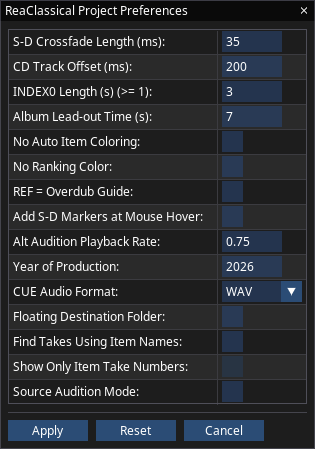
- S-D Crossfade Length (ms)
- The xfade length for all S-D edit functions. Default = 35ms.
- CD Track Offset (ms)
- The negative offset where CD markers are placed to the left of item starts. This is really for old CD players that could not process quick enough and skipped the start of audio. Default = 200ms.
- INDEX0 Length (s) (>= 1)
- If you add an exclamation mark to your CD track name in the metadata editor window, a countdown of this set length will visually appear on some CD Players. Default = 3 seconds.
- Album Lead-out Time (s)
- The amount of silence automatically set at the end of the album. Default = 7 seconds.
- No Auto Item Coloring
- To remove all automatic coloring of items, set to checked. You can still color items manually via the Colorize function K or add ranking colors via Record Panel or Notes. Default = unchecked.
- No Ranking Color
- To remove all ranking colors, set to checked. You can still color items manually via the Colorize function K. Default = unchecked.
- REF = Overdub Guide
- By default, the reference track acts as a way to A/B project material with an external reference audio file. To use as an overdub track see overdub. Default = unchecked.
- Add S-D Markers at Mouse Hover
- To avoid needing the track to be selected before placing S-D markers, set to checked. This also allows for opening the fade editor F by hover. Default = unchecked.
- Alt Audition Playback Rate
- The playrate used when using Shift+A etc. Default = x0.75.
- Year of Production
- Default = The year the project was created.
- CUE Audio Format
- The audio format that will be rendered to pair with the CUE file. Default = WAV.
- Floating Destination Folder
- For users who wish to always use the top folder as destination, this visually moves the destination folder just above the placement of source markers, making working in vertical workflow even easier without need for manual vertical scrolling. Note that when checked, the new S-D editing anywhere to anywhere is disabled and destination markers are always associated with the first folder. Default = unchecked.
- Find Takes Using Item Names
- If the audio material was not recorded in ReaClassical and the filenaming does not include a take number as a suffix, you can find takes based on item names instead by checking the option. Default = unchecked.
- Show Only Item Take Numbers
- By default, the item names show both session name (if present) and take numbers. For quicker visual location, set to checked to only show padded take numbers. Not available during the album mastering phase. Default = unchecked.
- Source Audition Mode
- By default, when setting source in and out markers, any previously existing ones are deleted. To convert previous pairs to take marker "regions" for use in the source audition manager Z, set to checked. Default = unchecked.
Screen reader users (Clara)
Accessible Preferences offers the same fifteen options as a keyboard-driven list: Up and Down move between options, Enter edits, Backspace resets the current option to its default and Escape closes. A "Reset All to Defaults" row restores everything. An additional "Other Settings" row holds three accessibility-oriented values: the marker/item nudge amount in milliseconds, the item edge grow/shrink amount in milliseconds (default 500) and the modifier multiplier applied by the "x modifier" versions of the nudge and grow/shrink actions.